
Enjoy using Sitemark?
How to Leave a Review for Sitemark in 6 Easy Steps
G2 is a trusted platform for authentic product and brand reviews. We're excited to hear from you and invite you to share your valuable feedback about Sitemark. Unlike other review platforms like Trustpilot, G2 specializes in B2B reviews, providing actionable insights for businesses like yours.
Step 1: Visit Sitemark's Profile on G2
Navigate to the product profile of the Sitemark solution on G2 using the button below:

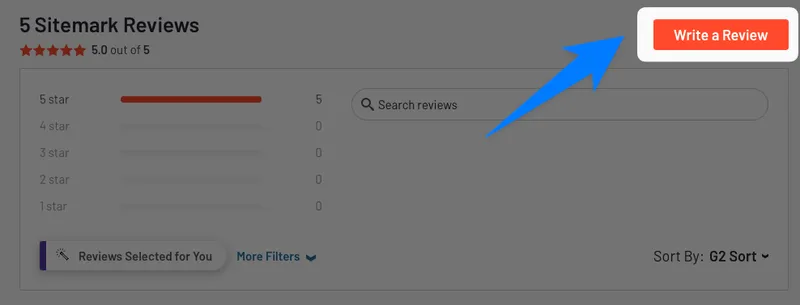
Step 2: Click “Write a Review”
Scroll down to just under the “Official downloads” section. You'll see the “Write a Review” button — simply click it to get started.
Step 3: Sign in to G2
To verify your review, sign in to G2 using one of the following methods:
- Sign in with your LinkedIn account for a quick and seamless experience.
- Sign in using your business email address.

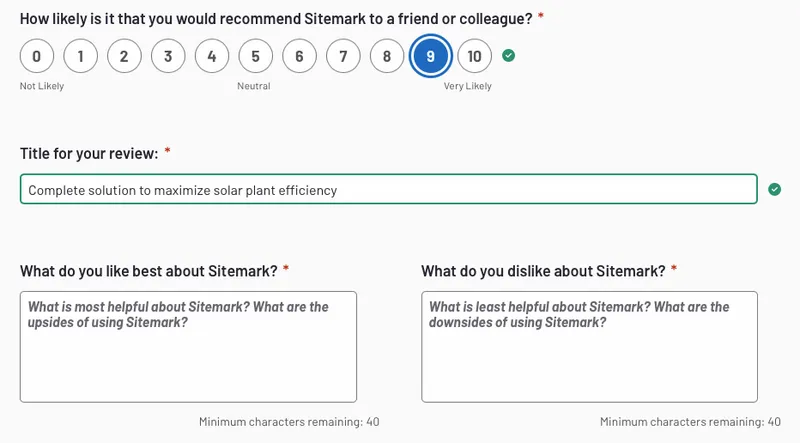
Step 4: Complete the Survey and Share Your Feedback
Fill in the survey fields, sharing your honest opinions about Sitemark. Let us know what you like, areas for improvement, and how Sitemark has helped you achieve your goals. It won't take more than 5 minutes!
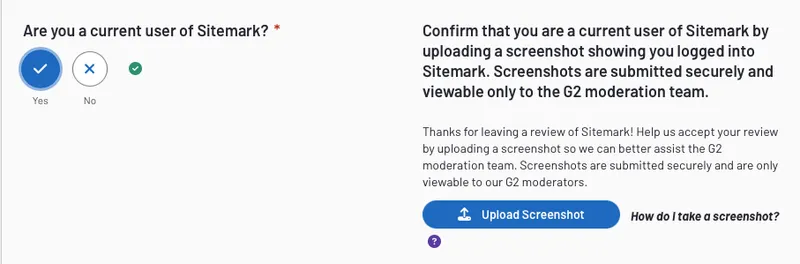
Step 5: Confirm Your Status as an Actual User
Log in to your Sitemark account and upload a screenshot to confirm your status as a verified user.
Step 6: Submit Your Review
Before submitting, review your ratings and ensure all fields are completed accurately. Make sure the green bars in the ratings section are fully filled.
Thank you for taking the time — it means a lot to our team.